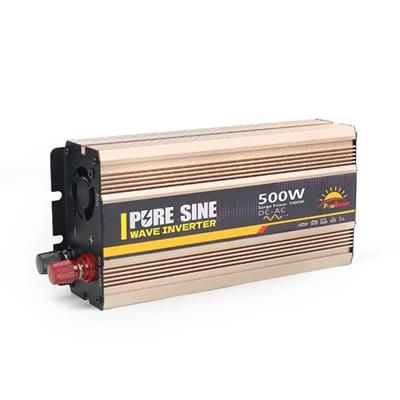
Yes — a small pure sine wave inverter of 150W to 300W will power and charge almost any laptop in a car safely. Check the wattage printed on your laptop's own power adapter, choose an inverter rated above that figure, and run the engine during long sessions so you do not flatten the starter battery. This guide from Zhejiang Sunrise New Energy Co., Ltd. explains the sizing, the connection options and the habits that keep both the laptop and the car battery healthy.
How Many Watts Does a Laptop Actually Need?Look at the adapter, not the laptop. Every laptop power brick prints its output or input rating — a thin ultrabook adapter is commonly rated around 45–65W, a mainstream laptop around 65–90W, and a large gaming or workstation laptop can draw 180–240W under load. The laptop rarely pulls the full rating continuously, but the inverter must be able to supply it whenever it does.
A simple rule covers most drivers:
Never size the inverter exactly to the adapter rating. Running any inverter at 100% of its rating for a whole working day makes it hot and shortens its life; 50–70% loading is the comfortable zone.
Why Should It Be Pure Sine Wave?A laptop adapter is a sensitive electronic power supply, and it is designed for clean household AC. A pure sine wave inverter reproduces that clean waveform, so the adapter runs cool and quiet, charging is stable, and there is no risk of the buzzing, extra heat or intermittent charging that modified sine wave output can cause in some adapters, screens and audio equipment.
The price difference at these small sizes is modest, and the laptop is usually worth far more than the inverter. For laptops, phones, cameras and any other charger-based electronics, pure sine wave is the safe default choice.

This is the decision most people get wrong, because the socket — not the inverter — is often the real limit.
Most car accessory sockets are fused at 10–15A, which at 12V means roughly 120–180W of usable power. A plug-in inverter of 150W or less is the right match: convenient, portable, and fine for an ultrabook or a mainstream laptop on its own. If you plug a 300W inverter into the socket and load it fully, you will simply blow the socket fuse — the inverter cannot deliver power the wiring cannot supply.
For 300W and above, connect the inverter to the battery terminals with the supplied clamps or ring terminals and a correctly rated inline fuse close to the battery. Keep the DC cables short and thick, and keep the inverter somewhere ventilated. Match the connection method to the load: socket for light laptop work, direct connection for anything bigger.
How Long Can You Work With the Engine Off?Shorter than most people expect. A typical car starter battery holds roughly 40–60Ah, and it is built for short starting bursts, not deep discharge. In practice, you should use only a small part of it before starting becomes risky. A 65W laptop load, after inverter losses, draws roughly 6A from the battery — so one to two hours of engine-off working is a sensible limit for a healthy battery, and less in winter or with an older battery.
For a full working day away from mains power, better options are:
Can a car inverter damage my laptop?
A correctly sized pure sine wave inverter does not damage a laptop; the laptop still runs from its own regulated adapter, which is what protects it. Damage risks come from undersized or poor-quality modified sine wave units run at their limit, and from loose, overheating DC connections — both avoidable with the choices above.
Can I charge a MacBook or a USB-C laptop without an inverter?
Often yes: many modern laptops charge from USB-C PD, and a 12V USB-C car charger rated for your laptop's wattage can be simpler and more efficient. An inverter is still the flexible option for several devices or other AC gear.
Why does my inverter shut down when I start the engine or plug in?
Starting the engine pulls the battery voltage down sharply for a moment, and plugging in an adapter can cause a brief inrush. Either can trip a small inverter's low-voltage or overload protection. Connect and switch on in the order above, and if shutdowns continue, the inverter is likely undersized for the adapter.
Can I power two laptops at once?
Yes, if you add both adapter ratings together and size the inverter — and the connection — for the total. Two mainstream laptops at about 90W each mean a 300W inverter on a direct battery connection, not a socket plug-in.
Work Anywhere, Without Risking the Drive HomeRead the adapter rating, add headroom, choose pure sine wave, and respect the socket's real limit — those four steps make laptop power in a car simple and safe. A 150W plug-in unit covers light travel work; a 300W unit on a direct connection covers almost everyone else.
Zhejiang Sunrise New Energy Co., Ltd. supplies pure sine wave inverters from 300W to 6000W for cars, RVs, trucks, home backup and off-grid solar. Tell us your laptop model, what else you want to run, and how long you need to work away from mains power, and we will recommend a matched inverter and connection method. Visit cninverter.com or contact us: WhatsApp 86 17706649699, email Long@cninverter.com.

We use cookies to enhance your browsing experience, serve personalized ads or content, and analyze our traffic. By clicking "Accept All", you consent to our use of cookies.